

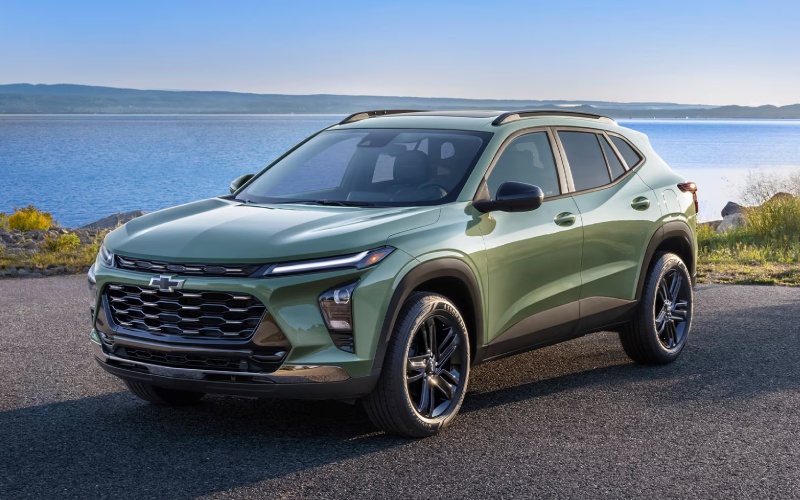
Mark Allen Chevrolet - How Chevy Safety Assist Enhances Safety in the 2026 Chevrolet Trax for Tulsa, OK Drivers
Daily driving has a rhythm. It’s the changing light at intersections, merging decisions on busy ramps, and a hundred small choices that add up to a confident commute. The 2026 Chevrolet Trax helps stack those choices in your favor with Chevy Safety Assist, a suite of six standard driver assistance features designed to be your extra set of eyes. From Forward Collision Alert and Automatic Emergency Braking to Lane Keep Assist with Lane Departure Warning, the Trax layers helpful alerts and interventions that support your focus and reduce fatigue—especially when traffic gets unpredictable around city corridors.
What stands out is how naturally the Trax blends this technology into the overall drive. You get a clear view from a cabin that feels more spacious than expected, quieted by Active Noise Cancellation, and centered around an available 11-inch center HD touch-screen that keeps navigation and media at a comfortable glance. Standard wireless Apple CarPlay® and Android Auto™ help you set routes or playlist choices before you move, so your hands stay on the wheel, and your eyes stay up. Add available wireless charging and a built-in Wi-Fi® hotspot, and the tech picture rounds out in a way that complements safety—not distracts from it.
- Forward Collision Alert and Automatic Emergency Braking: Monitors traffic ahead and can provide alerts and hard-braking assistance when a front-end collision risk is detected.
- Front Pedestrian Braking: Designed to help detect pedestrians directly ahead and can provide alerts and emergency braking in certain conditions.
- Lane Keep Assist with Lane Departure Warning: Gently assists steering to help keep you centered, with alerts if you drift without signaling.
- Following Distance Indicator: Displays a time gap to the vehicle in front, helping you maintain more consistent space in traffic.
- IntelliBeam® High Beam Assist: Automatically toggles your high beams on dark roads when it’s safe to do so, then dims for oncoming traffic.
In practical terms, these systems shine during common scenarios. Rush-hour crawls reward patience; the Trax adds a buffer of awareness so you can better manage stop-and-go pacing. Evening drives on less-lit stretches benefit from IntelliBeam® High Beam Assist, which reduces the mental micro-calculations of headlight control. Lane guidance trims down drift on wide arterials, and pedestrian detection provides timely alerts in busy retail districts or near schools. It’s not about replacing driver attention—it’s about smoothing decision-making and chipping away at everyday stress.
Trim choices let you shape the experience around your style. If you like an expressive look, 2RS leans into black bowtie emblems and Red interior accents, while ACTIV adds Titanium chrome exterior touches and blackout wheels for a confident stance. The cabin’s flexible cargo area and 60/40 split-folding rear seat handle everything from gym bags to weekend gear, and the ECOTEC® 1.2L Turbo brings responsive performance that feels tuned for urban agility. It’s a smart balance: comfort that keeps you fresh, connected tech that stays out of the way, and standard safety that works quietly in the background.
Customers often ask how to get the most from these features. Start by walking through the driver information menus to personalize alert tones and sensitivity, where settings allow. If you carpool with family or share the vehicle, make sure each driver knows where to view safety alerts on the instrument display and infotainment screen. It’s also worth exploring your preferred navigation app’s lane guidance and traffic overlays via Apple CarPlay® or Android Auto™; when paired with the Trax’s built-in systems, you create a layered picture of what’s ahead that feels more complete.
For many shoppers, this all adds up to a sense of calm behind the wheel—the kind you notice most after a long week. If you want a personal walkthrough of how these features look and feel in real time, Mark Allen Chevrolet offers friendly, hands-on demos that help you choose the right trim and settings for your routine.
Frequently Asked Questions:
Are all Chevy Safety Assist features standard on every 2026 Trax?
Yes. The suite includes Forward Collision Alert, Automatic Emergency Braking, Front Pedestrian Braking, Lane Keep Assist with Lane Departure Warning, Following Distance Indicator, and IntelliBeam® High Beam Assist as standard.
Do these features work in heavy rain or snow?
Performance can be affected by visibility and road conditions. Always drive attentively, and consider manual adjustments to your following distance and speed during adverse weather.
Can I turn off specific alerts?
Some alerts and assistance settings are customizable via the infotainment and driver information menus. Review your Owner’s Manual for exact steps and options by trim.
Which trim is best if I want the largest display for maps?
The available 11-inch center HD touch-screen is offered on select trims; it’s a smart pick if you rely heavily on navigation through Apple CarPlay® or Android Auto™.
Is there support if I’m new to these systems?
Absolutely—our team provides feature setup and demonstrations, serving Tulsa, Broken Arrow, and Jenks, so you can tailor alerts and connectivity to your preferences before you head out.
Request more 2026 Chevrolet Trax information
Categories:
Chevrolet Trax